Zapier vs Make If you’ve started looking into workflow automation, Zapier and Make come up almost immediately. Both let you connect apps and automate repetitive tasks without writing code, but they take noticeably different approaches — one built for speed and simplicity, the other for control and complexity.
Quick Answer
Zapier is the better choice if you want the fastest setup and the widest range of app integrations. Make is the better choice if you need more complex, branching workflows and want more control for a lower starting price. A common pattern I’ve seen: people learn the basics on Zapier, then graduate to Make once a workflow needs more than a simple trigger and action.
Zapier vs Make: Quick Comparison
| Feature | Zapier | Make |
| Setup style | Linear, trigger-and-action | Visual, node-based canvas |
| Learning curve | Very beginner-friendly | Steeper, more powerful |
| App integrations | 7,000+ | 2,000–3,500 |
| Workflow complexity | Best for simple, one-to-one tasks | Handles branching, loops, filters |
| Starting price | Around $30/month | Around $9/month |
| Pricing model | Per successful action | Credit-based per operation |
Which Is Easier to Set Up, Zapier or Make?
Zapier wins this clearly. Its model is straightforward: pick a trigger, pick an action, done. There’s a reason it’s often the first automation tool people try — you can build a working “Zap” in a few minutes with no prior experience.
Make uses a visual, flowchart-style canvas instead. It’s more powerful once you understand it, but there’s a real learning curve compared to Zapier’s simpler step-by-step model. Winner: Zapier
Which Handles Complex Workflows Better?
This is where Make pulls ahead. Zapier is built around simple, linear automations — trigger leads to action, one path. Make supports branching paths, loops, filters, and data iterators within a single scenario, which makes it far better suited to workflows that need to make decisions or handle multiple conditions.
If your automation needs are simple, this advantage won’t matter much. If they’re not, it matters a lot — the same way choosing between a simple task board and a more flexible workspace comes down to how complex your actual workflow is. Winner: Make
Which Has More App Integrations?
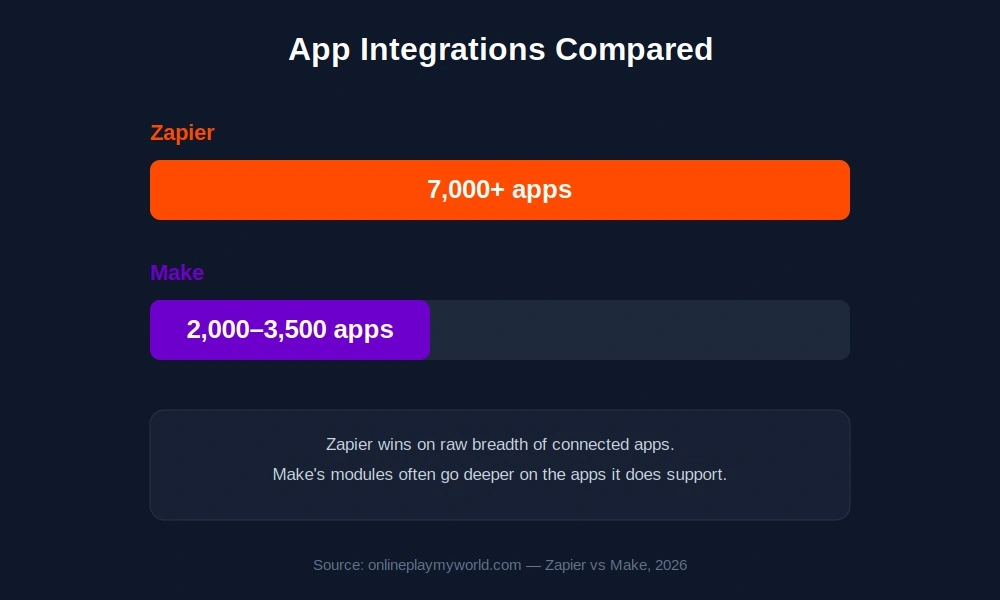
Zapier connects to over 7,000 apps, giving it a significant edge in raw breadth. Make supports somewhere in the 2,000–3,500 range, which still covers most popular tools but leaves more gaps for niche or newer software.
That said, Make’s modules often provide deeper functionality within each integration, so fewer connections doesn’t always mean less capability — it depends on which specific apps you need. Winner: Zapier for breadth, Make for depth on the apps it does support
Zapier vs Make Pricing: What You’ll Actually Pay
Pricing is one of the most searched parts of this comparison, and the two platforms structure it very differently.
Zapier’s paid plans start around $30/month and charge based on the number of successful actions (steps completed within a Zap). Simple automations use few actions per run; complex ones use more, which can add up.
Make’s core plans start much lower, around $9/month, but use a credit-based system where every operation — not just successful runs — consumes credits. For complex, high-volume workflows, this can work out cheaper, but it takes some upfront math to estimate.
If your budget is tight and your workflows are complex, Make usually comes out ahead on cost. If you’d rather know exactly what you’re paying each month without doing credit math, Zapier is the more predictable option . If you’re comparing software costs generally, our breakdown of Stripe vs PayPal fees covers a similar cost-structure tradeoff for payment processing.
Zapier vs Make for Beginners
If you’ve never built an automation before, Zapier is the more forgiving starting point. Its linear trigger-and-action model matches how most people naturally think about “when X happens, do Y,” and the interface guides you through each step.
Make can absolutely be learned by beginners too, but expect to spend more time in the first week or two understanding the canvas before things click.
Zapier vs Make for Complex, Multi-Step Automations
Once workflows involve conditional logic — “if this, then that, unless this other thing happens” — Make’s visual builder becomes the clear advantage. Trying to replicate the same branching logic in Zapier usually means stacking multiple separate Zaps together, which gets harder to manage as complexity grows.
Teams running multi-step marketing funnels, data syncing across several tools, or workflows with several decision points tend to outgrow Zapier’s simpler model eventually.
What About Alternatives Like n8n?
n8n is worth a mention too, especially if you’re comfortable with a bit more setup work. It’s open-source, self-hostable, and free to run on your own infrastructure, which appeals to teams that want full control and no per-operation pricing. The tradeoff is that it requires more technical setup than either Zapier or Make, making it less approachable for non-technical users just getting started with automation.
Frequently Asked Questions
Which is better, Zapier or Make?
It depends on your workflow needs. Zapier is better for simple, fast automations with the widest app support. Make is better for complex, branching workflows and offers more power for a lower starting price.
Which is cheaper, Zapier or Make?
Make’s core plans start lower, around $9/month, compared to Zapier’s roughly $30/month starting price. However, Make’s credit-based system means costs can vary depending on workflow complexity.
Can I try Zapier or Make without paying?
Both offer free plans with limited usage, letting you test basic automations before committing to a paid tier.
Is there anything better than Zapier?
Better” depends on the use case. Make offers more complex workflow logic, while n8n offers a free, self-hosted, open-source alternative for more technical users.
Can I use Zapier and Make together?
Yes, though most teams pick one as their primary automation platform to avoid managing overlapping workflows across two systems.
Is Make harder to learn than Zapier?
Generally, yes. Zapier’s linear model is more beginner-friendly, while Make’s visual canvas is more powerful but takes longer to feel comfortable with.
Final Verdict: Zapier vs Make
If you want the fastest path to your first working automation, and simplicity matters more than advanced logic, Zapier is the safer starting point.
If you’re comfortable with a slightly steeper learning curve and need workflows with real branching logic — or you want more automation power for a lower starting price — Make is generally the stronger long-term choice. A common pattern among growing teams: start with Zapier to learn automation basics, then move complex workflows to Make once the limitations of simple linear automations start to show.
This article was researched and published by the Techsaaswrote Editorial Team to provide accurate, helpful, and up-to-date information for our readers.